

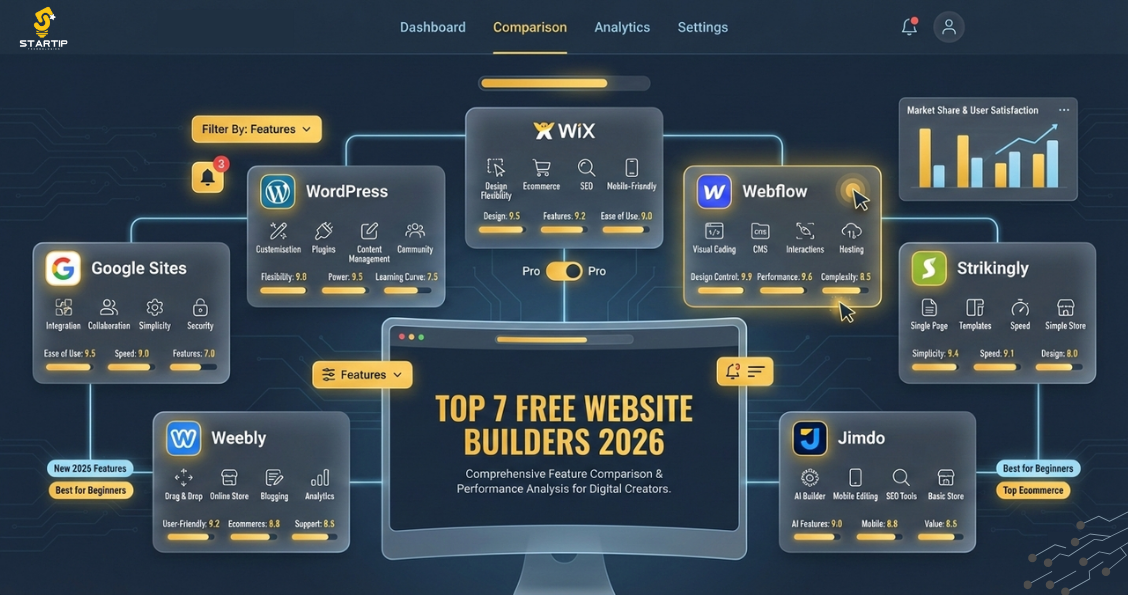
In 2026, the internet is expected to be more crowded than ever. In fact, according to Forbes Advisor, there are over 1.2 billion websites worldwide. Yet only about 16% are actively maintained with most new websites being built using no-code or low-code platforms.
Free website builders have changed the way people go online. That means you now no longer need to learn coding skills or form a big budget to create professional looking websites. At Startip Technologies, we believe in educating the people regarding their best interest. The same is why, below we have discussed top 7 free website builders in 2026, along with their overviews, pros, cons, and key features for your help. Hence, make sure to stay tuned till the end.
1. Wix
Wix is one of the most widely used website builders globally, trusted by millions of users. It offers a true drag-and-drop editor that allows complete design freedom without requiring any coding skills. With hundreds of templates and built-in tools, Wix makes it easy to create visually appealing websites quickly. It’s especially popular among beginners and small businesses.
Pros
- Beginner-friendly drag-and-drop interface
- 800+ modern templates
- Built-in SEO and blogging tools
Cons
- Wix ads appear on free websites
- No custom domain on the free plan
Best for: Beginners, personal websites, and small business portfolios.
2. WordPress.com
WordPress.com is a hosted platform built on the powerful WordPress ecosystem. It is best known for content creation, blogging, and long-form publishing. While it offers less visual freedom than drag-and-drop builders, the WordPress website development excels in scalability and content management. Many websites start here and grow into fully customized platforms later.
Pros
- Strong blogging and content tools
- Scalable for long-term growth
- Large theme and plugin ecosystem
Cons
- Slight learning curve for beginners
- Advanced features require paid plans
Best for: Blogs, writers, and content-heavy websites.
3. Google Sites
Google Sites is a lightweight and completely free website builder designed for simplicity. It allows users to create basic websites quickly using a clean interface. The platform works seamlessly with Google Workspace tools like Docs, Sheets, and Drive. However, it focuses more on functionality than design flexibility.
Pros
- 100% free with no hidden charges
- Very easy to use
- Smooth integration with Google Docs, Drive, and Sheets
Cons
- Limited design flexibility
- Not suitable for business or ecommerce sites
Best for: Simple informational websites and internal projects.
4. Webflow
Webflow is another professional website builder. It is basically designed to fill the gap between the design and development. That means, the platform allows users to form an advanced layout and gain full control over clean and production-ready code. The same is why this platform is commonly used by designers and agencies.
Pros
- High-level design customization
- Clean, professional layouts
- Great performance and animations
Cons
- Steep learning curve
- Free plan has limitations
Best for: Designers, developers, and professional portfolios.
5. Weebly
Weebly is a beginner friendly website builder that combines simplicity with essential business features which is owned by “Square” The platform allows one to leverage the simple drag and drop feature to form a website with basic functionality. Although the platform does not support advanced customization, it still is a great choice for people who need simple interfaces and straightforward websites.
Pros
- Easy drag-and-drop editor
- Built-in ecommerce tools
- Clean and responsive templates
Cons
- Limited design flexibility
- Basic SEO tools on free plan
Best for: Small businesses and beginner online stores.
6. Strikingly
Strikingly focuses on one-page websites that are fast, clean, and mobile-friendly. It’s designed for users who want a strong online presence without managing complex layouts. The platform is ideal for landing pages, portfolios, and personal brands. Its simplicity is its biggest strength — and limitation.
Pros
- Fast setup
- Excellent for one-page designs
- Mobile-optimized templates
Cons
- Limited multi-page support
- Not suitable for large websites
Best for: Portfolios, resumes, and landing pages.
7. Jimdo
Jimdo uses artificial intelligence to simplify website creation. Users answer a few questions, and the platform automatically generates a website structure. It’s designed for speed and ease rather than deep customization. Jimdo suits small businesses or individuals who want to get online with minimal effort.
Pros
- AI-assisted website creation
- Simple and beginner-friendly
- Good for quick launches
Cons
- Limited customization options
- Free plan has restricted features
Best for: Small projects and fast website launches.
Why Start with Free Website Builders?
Free website builders are perfect for testing ideas, building early traction, and learning how websites work. In addition, Many startups that later move to custom development first validate their ideas using free tools.
At StartipTechnologies, we help startups and individuals choose the right platform at the right stage through our services — whether that’s starting free or upgrading to a fully customized website when growth demands it.
Conclusion
Website building is no longer a hectic task in today’s world. With free website builders you do not have to be a pro coder or someone with a big budget to form a website. In the content above, we have discussed top 7 tools and platforms you can rely upon in this regard
Each platform has its strengths and limitations. However, the key is choosing one that matches your current goals. When you’re ready to scale, improve performance, or add advanced features, StartipTechnologies is always here to help you build smarter and grow faster.
About This Article
This article is written by the web development team at Startip Technologies, with hands-on experience in no-code platforms, free website builders, and custom website development for startups and growing businesses.